
Download Disk Cartography – Free Disk Space Analyzer, Visual Mapping Tool
Overview
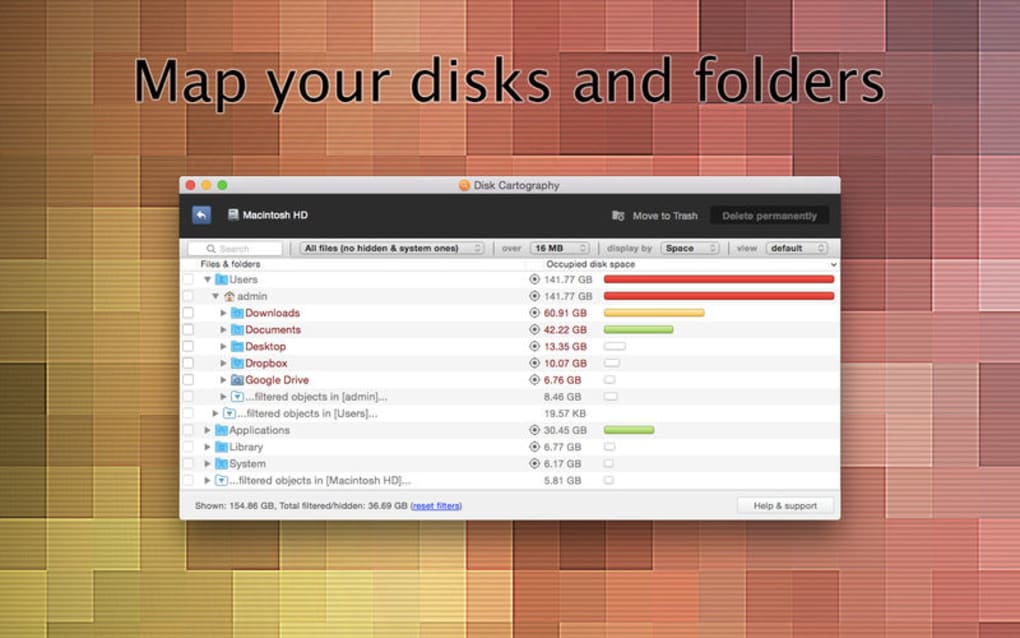
Disk Cartography – Clever Disk Space Analyzer is a free, lightweight utility that helps Windows, macOS, and Android users visualize exactly how their storage is being consumed. Developed by 508 Software, the program scans any mounted drive, external hard‑disk, USB stick, or memory card and translates raw file‑system data into intuitive graphics. By converting gigabytes into color‑coded blocks, pie charts, and tree maps, Disk Cartography makes it effortless to spot large folders, duplicate files, or hidden caches that are silently eating up valuable space.
The tool is particularly handy for users who prefer a visual approach over traditional list‑based file explorers, as it lets you “see” the problem before you decide whether to move, delete, or archive data. While the core scanning engine is fast on modest drives, the software also offers a session‑saving feature so you can reload previous scans and compare growth over time. Although it lacks some of the deep‑cleaning tricks found in commercial suites—such as automatic registry sweeps or temporary‑file purging—its straightforward interface, secure file‑handling (no background telemetry), and cross‑platform support make it a solid choice for anyone who wants a free, no‑frills way to reclaim disk space.
Key Features
- Interactive visual maps – tree‑map, radial, and bar‑graph views for instant insight.
- Color‑coded sizing – red highlights the biggest space consumers, green shows small files.
- Automatic and manual sorting – sort by size, file type, date modified, or custom tags.
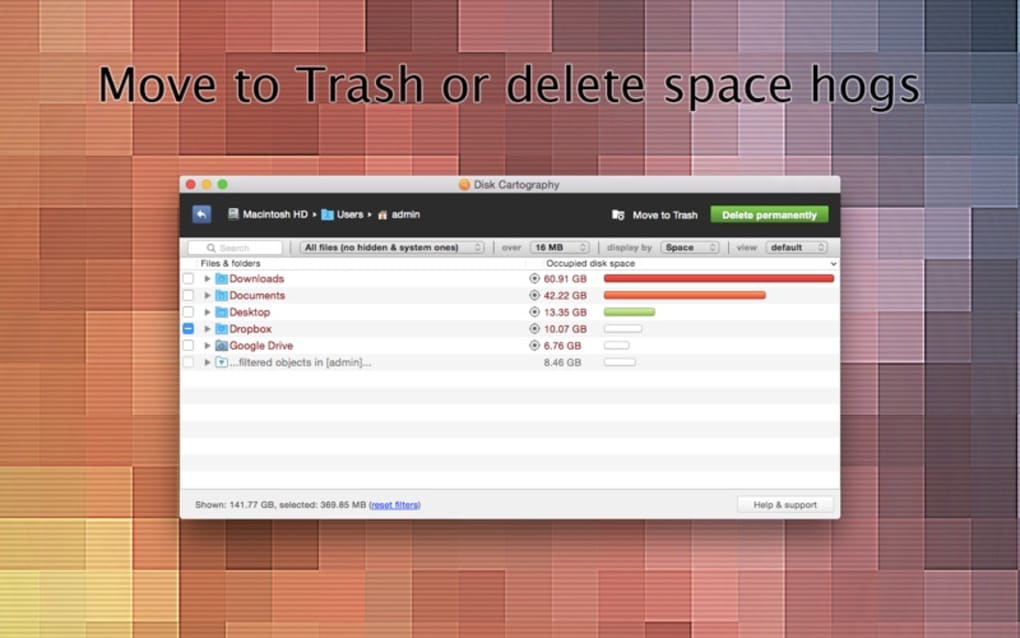
- One‑click file actions – move to recycle bin, permanently delete, or shift to another drive.
- Session saving – export scan results, reload later, and track storage trends over weeks or months.
- Cross‑platform compatibility – native builds for Windows 10/11, macOS 10.13+, Android 6+, and iOS 12+.
- Secure operation – no internet connection required, and the app never uploads your file list.
- Lightweight footprint – installer under 10 MB, minimal RAM usage during scanning.
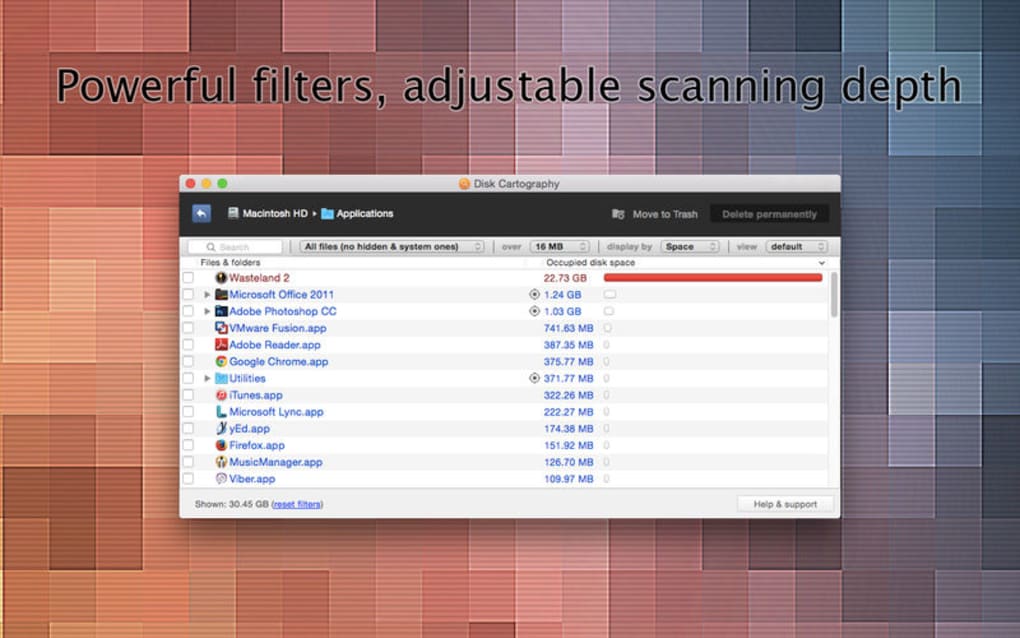
- Customizable filters – exclude system folders, hide hidden files, or focus on specific extensions.
- Export options – generate CSV or PDF reports for IT audits or personal records.
The feature set is deliberately kept simple, which means the learning curve is virtually nonexistent. New users can launch the program, pick a drive, and watch the visual map fill in within seconds. Power users, however, can dive into the advanced sorting menu to isolate, for example, all video files larger than 1 GB, then batch‑move them to an external archive. This flexibility is where Disk Cartography shines: it offers enough depth for tech‑savvy audiences while staying approachable for everyday PC owners who just want to free up space before installing a new game or software update.
Installation & Usage Guide
Step‑by‑Step Installation
- Visit the official 508 Software website and click the Download Disk Cartography button for your operating system (Windows, macOS, Android, or iOS).
- For Windows/macOS, run the installer (DiskCartographySetup.exe or .dmg). Follow the on‑screen prompts – accept the license agreement, choose an installation folder (default is fine), and click “Install”.
- Android users can download the APK from the Play Store alternative page; iOS users receive a direct App Store link. Tap “Install” and allow any necessary permissions (storage access).
- Once installation finishes, launch the app from the Start menu, Applications folder, or home screen shortcut.
First Scan and Navigation
When you open Disk Cartography, the main dashboard presents a “Select Drive” dropdown. Choose the volume you want to analyze—whether it’s your C: drive, an external SSD, or a mounted SD card. Click Start Scan. The scanning engine reads the file system hierarchy, aggregates sizes, and begins populating the visual map. On large drives (1 TB+), the initial scan may take 2‑5 minutes; progress is displayed as a percentage bar and a live preview of the map.
After the scan completes, you can toggle between visual modes using the toolbar: Tree Map, Radial Chart, and Bar Graph. Hover over any block to reveal a tooltip with the exact folder name, size, and percentage of total space. Right‑click (or tap‑and‑hold on mobile) a block to open the context menu, where you can choose to Open Folder, Move to Trash, Delete Permanently, or Move to Another Drive. The application also provides a “Filter” pane on the right side—use it to exclude system folders like Windows or Library, or to focus on specific file extensions such as .mp4 or .iso.
Saving Sessions and Generating Reports
To preserve a scan for future reference, click the Save Session icon. Name the file (e.g., “April‑2025‑DriveC”) and store it locally. Later, you can reload the session via Load Session and instantly compare size changes. For audit purposes, choose Export Report and select CSV or PDF. The generated document includes a summary table, visual snapshots, and a breakdown of the top 20 largest directories.
Overall, the workflow is designed to be as frictionless as possible: scan, visualize, act, and repeat. The intuitive UI means you’ll spend less time hunting through folders and more time making informed decisions about what to keep, move, or discard.
Compatibility & System Requirements
Disk Cartography runs on the following platforms:
- Windows: 10, 11 (64‑bit). Requires .NET Framework 4.7 or later.
- macOS: 10.13 (High Sierra) and newer, both Intel and Apple Silicon (via Rosetta 2 for Intel binaries).
- Android: 6.0 (Marshmallow) and later, ARM‑based devices with at least 1 GB RAM.
- iOS: 12.0 and later, iPhone & iPad, requires 100 MB free storage for installation.
The application is fully native—there are no Java or browser dependencies—so it starts quickly and uses minimal background resources. For optimal performance on very large drives (over 2 TB), we recommend a system with at least 4 GB of RAM and an SSD, as disk I/O speed directly influences scan time. Disk Cartography also respects OS security models; on macOS and iOS it requests standard “Full Disk Access” only when you initiate a scan, and on Windows it runs with standard user privileges unless you explicitly launch it as administrator.
Pros and Cons
Pros
- Completely free with no hidden ads or trial limitations.
- Powerful visualizations make storage analysis intuitive.
- Cross‑platform support (Windows, macOS, Android, iOS).
- One‑click actions for moving, deleting, or archiving files.
- Session saving and exportable reports for long‑term tracking.
- Lightweight installer and low RAM usage.
- No internet connection required—entirely offline and privacy‑friendly.
Cons
- Lacks advanced cleaning modules (e.g., registry cleaners, temp file sweepers).
- Scanning large drives can be time‑consuming compared to some paid competitors.
- No built‑in duplicate‑file finder; users must locate duplicates manually.
- Interface, while clean, may feel basic for power users seeking scripting or automation.
- Limited support options—reliant on community forums and email ticketing.
Frequently Asked Questions
Can Disk Cartography scan network drives?
Yes. By selecting a mapped network location in the “Select Drive” dropdown, Disk Cartography will treat it like any local volume. However, scan speed depends on network latency and permissions.
Is there any risk of data loss when using the delete function?
Disk Cartography offers two deletion options: moving files to the OS recycle/trash bin (recoverable) and permanent deletion (irreversible). The app always prompts for confirmation before any destructive action, helping prevent accidental loss.
Can I schedule automatic scans?
The free version does not include a built‑in scheduler. Users can create OS‑level tasks (Task Scheduler on Windows or cron jobs on macOS/Linux) to launch the application with the appropriate command‑line arguments for periodic scans.
Does Disk Cartography work on encrypted drives?
If the drive is already unlocked and mounted by the operating system, Disk Cartography can read its contents. It cannot bypass encryption; the drive must be accessible before scanning.
How often are updates released?
The development team typically releases minor updates every 2–3 months, focusing on bug fixes and UI tweaks. Major feature upgrades appear roughly once a year.
Conclusion & Call to Action
Disk Cartography – Clever Disk Space Analyzer delivers exactly what its name promises: a clear, visual map of your storage landscape without charging a dime. Its strength lies in the intuitive graphics, straightforward file‑action buttons, and cross‑platform availability. While power users may miss deeper cleaning utilities, the application’s lightweight nature, offline operation, and privacy‑first design make it an excellent first line of defense against disk‑space bloat. If you’re looking to reclaim gigabytes before a major Windows update, free up space for a new macOS app, or simply understand where that mysterious 10 GB went on your Android tablet, Disk Cartography is ready to help.
Ready to see your files in a whole new light? Download Disk Cartography now and start visualizing, cleaning, and optimizing your storage—free, secure, and instantly.







